


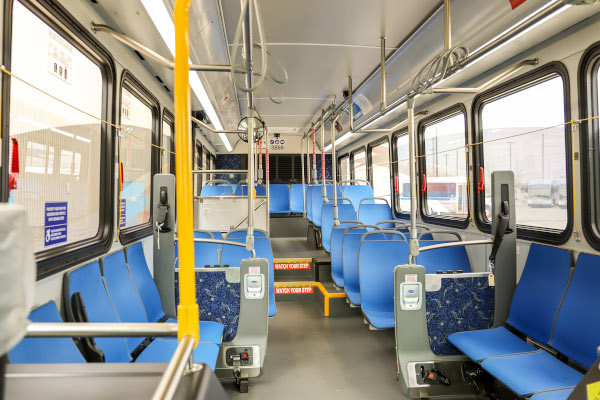
Welcome aboard RTA! If you're new to our system, kick back and enjoy, much like you would do on one of our buses or trains, and let this page explain how simple it is to use our system.
To plan your trip, you can use a few different methods:
- Google Transit offers automated trip planning. All you need to do is enter the starting and ending points of your trip, and what day and time you would like to arrive or depart.
- If you're a do-it-yourself kind of person, get a copy of the system map, and then:
- Locate the route number closest to your starting point.
- Locate the route number closest to your destination.
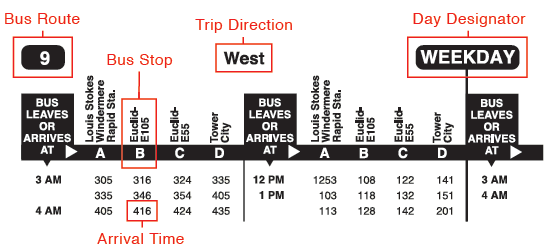
- Look at a timetable/schedule specific to the route number(s) you need, and figure out what time the bus/rapid will reach your starting point. To understand how to read a timetable
- If the starting and ending route numbers are different, you will need to transfer. All 5-trip farecards include 2-1/2 hour transfer privileges, and time-based (All-Day, 7-Day, Monthly) farecards allow for unlimited usage during the time period. If you are paying cash, you will have to pay full fare on each bus or train you ride, and you must have exact change. Operators do not make change.
- If you need assistance, call the Community Connection Line at 216-621-9500. It is staffed Monday-Friday, 7 a.m.-6 p.m., and Saturdays from 8 a.m.-4:30 p.m. An RTA staffer will answer your questions. Be prepared to provide them with the address of your current location and the address of your destination.
Once you have a plan worked out, just follow these simple steps:
If you're using the bus, look for the round target symbol (Figure 1) to locate a stop. Some stops may also have route numbers listed on the sign (Figure 2).

Figure 1 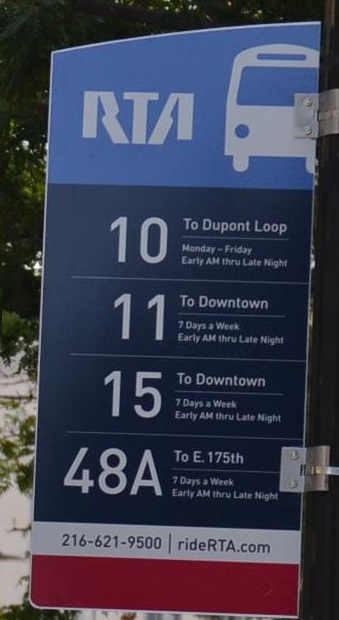
Figure 2 - BUS: When your bus arrives, let it come to a complete stop, and board. Pay your fare with exact change, or swipe your pass or farecard through the farebox.
- PROOF OF PAYMENT: The Red Line Rapid and HealthLine BRT on Euclid Avenue use a Proof of Payment system. Be sure you pay your fare before you board. Ticket vending machines (TVMs) are located inside all Red Line Rapid Stations, and all HealthLine stations. Retain your activated farecard or pass until you exit the system.
- BLUE & GREEN LINES: Traveling westbound (toward downtown), pay your fare as you leave the train. Traveling eastbound (toward Shaker Heights), pay your fare when you board.
- Have a seat, chat with other riders, stare out the window, daydream, read, or do nothing at all - it's your choice.
- Operators announce all stops. When your stop is near, pull the stop cord or press the stop bar to signal the operator. If you're uncertain about your stop location, ask the operator.
- Repeat the process as necessary to reach your final destination.
General advice before starting your trip:
- Plan ahead: Use our website or Transit app for trip planning to map out your route, check schedules, and get real-time updates on delays or changes. This way, you can avoid any surprises and plan your time accordingly.
- Know your options: Familiarize yourself with the different routes and services offered by GCRTA. Understanding the options available to you will help you find the most efficient and convenient way to reach your destination. GCRTA provides system maps for routes throughout the city of Cleveland at many transit stations, or use our interactive map.
- Use well-lit stops and stations: When waiting for your bus or train, choose stops and stations that are well-lit and have other people around. Avoid isolated areas, especially at night.
- Dress for the weather: Cleveland's seasons can sometimes be unpredictable.
- It's best to arrive at your stop at least 5 minutes early.
- The final destination for the bus/rapid will be listed on the front of the vehicle.
- Secure your belongings: Keep your belongings close to you and ensure that your bags, backpacks, and purses are closed and zipped up.
- Maximize your transfers: Give yourself enough time in between buses to make any necessary connections, and maximize the use of your fare.
- Service animals are welcome without restrictions. Pets are welcome if they weigh no more than 25lbs. and stay in a pet carrier during your entire ride.
- Report any suspicious activity: If you notice anything unusual, or feel unsafe during your journey, report it to the GCRTA Transit Police at 216-566-5163, 24/7, or text Transit Police Dispatch using 216-575-EYES (3937). This system allows you to send SMS, photo, or video messages directly to dispatchers to report suspicious or criminal activity.
- Be respectful: Remember to be courteous to fellow passengers and follow the rules and regulations of GCRTA vehicles. This will create a more pleasant environment for everyone on board.
Still unsure about using RTA services? Try Travel Training.